🔧 🔄️ AI warehouse inventory cycle count bot using GPT, Telegram and Google Sheets
⚡ 830 views · 🔧 Miscellaneous
Description
Tags: Logistics, Supply Chain, Warehouse Operations, Paperless Processes, Inventory Management
Context
Hi! I’m Samir, Supply Chain Engineer, Data Scientist based in Paris, and founder of LogiGreen.
> Let’s use AI with n8n to help SMEs digitalise their logistics operations!
Traditional inventory cycle counts often require clipboards, scanners, and manual reconciliation.
With this workflow, the operator walks through the warehouse, sends voice messages, and the bot automatically updates the inventory records.

Using AI-based transcription and structured extraction, we optimise the entire process with a simple mobile device connected to Telegram.
📬 For business inquiries, you can find me on LinkedIn
Demo of the workflow
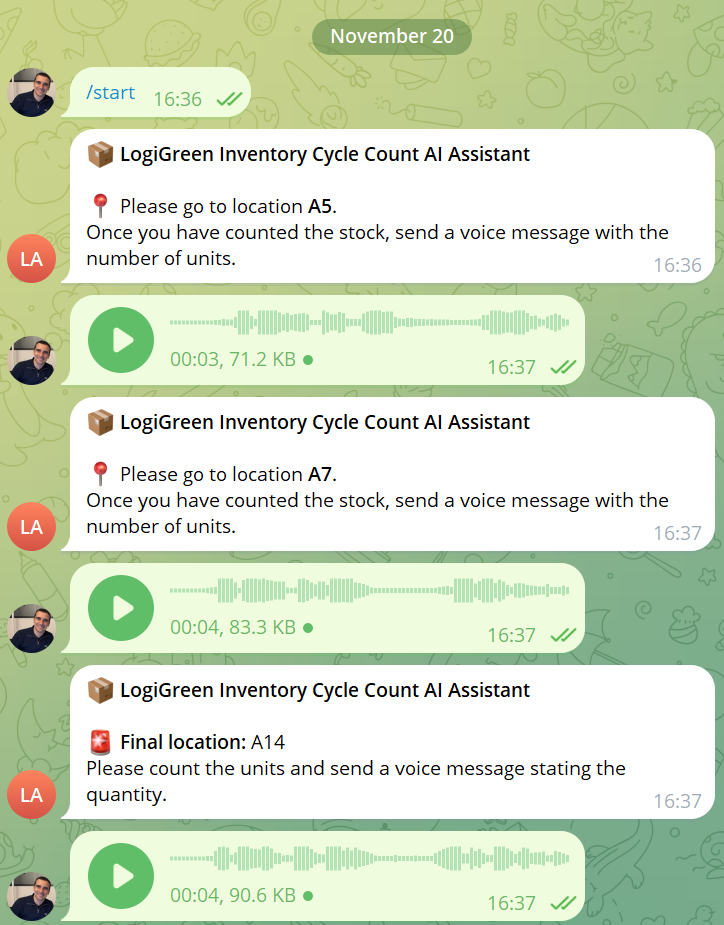
In this example, the bot guides the operator through the cycle count for three locations.
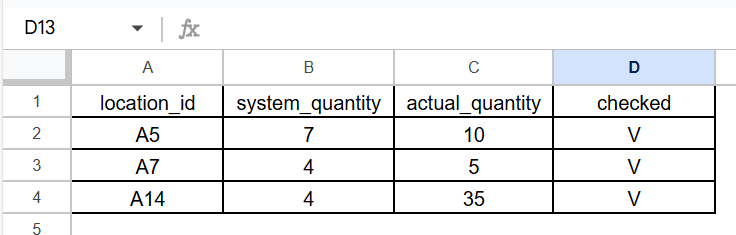
The workflow automatically records the results in Google Sheets.
Who is this template for?
This template is ideal for companies with limited IT resources:
- Inventory controllers who need a hands-free, mobile-friendly counting process
- Small 3PLs and retailers looking to digitalise stock control
🎥 Tutorial
A complete tutorial (with explanations of every node) is available on YouTube:
What does this workflow do?
This automation uses Telegram and OpenAI’s Whisper transcription:
- The operator sends /start to the bot.
- The bot identifies the first location that still needs to be counted.
- The operator is guided to the location through a Telegram message.
- The operator records a voice message with the
location IDand thenumber of unitscounted. - AI nodes transcribe the audio and extract
location_idandquantity. - If the message cannot be transcribed, the bot asks the operator to repeat.
- If the location is valid and still pending, the Google Sheet is updated.
- The bot sends the next location, until the final one is completed.
- The operator receives a confirmation that the cycle count is finished.
Next Steps
Before running the workflow, follow the sticky notes and configure:
- Connect your Telegram Bot API
- Add your OpenAI API Key to the transcription and extraction nodes
- Connect your Google Sheets credentials
- Update the Google Sheet ID and the worksheet name in all Spreadsheet nodes
- Adjust the AI prompts depending on your warehouse location naming conventions
Submitted: 20 November 2025
Template designed with n8n version 1.116.2
🔗 Nodes Used
Google Sheets, Telegram, Telegram Trigger, AI Agent, OpenAI Chat Model, Structured Output Parser
📥 Import
Download workflow.json and import into n8n:
Workflow menu → Import from File