🔧 Scrape & import shoe products to Shopify with BrowserAct (with variants & images)
⚡ 736 views · 🔧 Miscellaneous
💡 Pro Tip — HTTP Request scraping tends to break when sites update their markup. If you’re scraping a major platform, check if ScraperNode covers it — it has maintained scrapers for LinkedIn, Instagram, TikTok, YouTube, and 20+ other platforms that return structured data.

Description
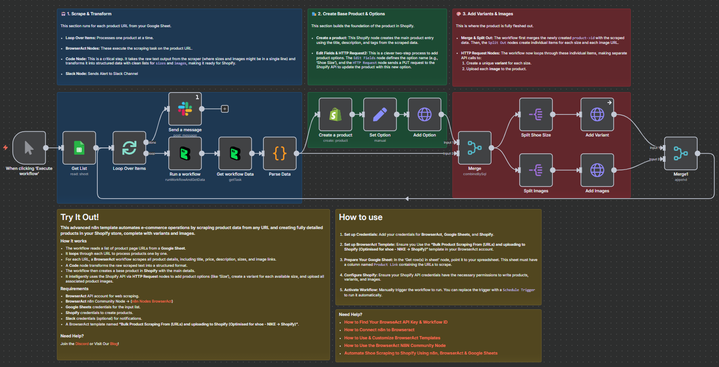
Scrape & Import Products to Shopify from Any Site (with Variants & Images)-(Optimized for shoes)
This advanced n8n template automates e-commerce operations by scraping product data (including variants and images) from any URL and creating fully detailed products in your Shopify store.
This workflow is essential for dropshippers, e-commerce store owners, and anyone looking to quickly import product catalogs from specific websites into their Shopify store.
Self-Hosted Only
This Workflow uses a community contribution and is designed and tested for self-hosted n8n instances only.
How it works
-
The workflow reads a list of product page URLs from a Google Sheet. Your sheet, with its columns for Product Name and Product Link, acts as a database for your workflow.
-
The Loop Over Items node processes products one URL at a time.
-
Two BrowserAct nodes run sequentially to scrape all product details, including the
Name,price,description,sizes, andimage links. -
A custom Code node transforms the raw scraped data (where fields like sizes might be a single string) into a structured JSON format with clean lists for
sizesandimages. -
The Shopify node creates the base product entry using the main details.
-
The workflow then uses a series of nodes (Set Option and Add Option via HTTP Request) to dynamically add product options (e.g., “Shoe Size”) to the new product.
-
The workflow intelligently uses HTTP Request nodes to perform two crucial bulk tasks:
- Create a unique variant for each available size, including a custom SKU.
- Upload all associated product images from their external URLs to the product.
-
A final Slack notification confirms the batch has been processed.
Requirements
- BrowserAct API account for web scraping
- BrowserAct “Bulk Product Scraping From (URLs) and uploading to Shopify (Optimized for shoe - NIKE -> Shopify)” Template
- BrowserAct n8n Community Node -> (n8n Nodes BrowserAct)
- Google Sheets credentials for the input list
- Shopify credentials (API Access Token) to create and update products, variants, and images
- Slack credentials (optional) for notifications
Need Help?
-
How to Find Your BrowseAct API Key & Workflow ID
-
How to Connect n8n to Browseract
-
How to Use & Customize BrowserAct Templates
-
How to Use the BrowserAct N8N Community Node
Workflow Guidance and Showcase
🔗 Nodes Used
Google Sheets, HTTP Request, Slack, Shopify
📥 Import
Download workflow.json and import into n8n:
Workflow menu → Import from File