💬 Automate product training & customer support via WhatsApp, GPT-4 & Google Sheets
⚡ 38,459 views · 💬 Support Chatbots
Description
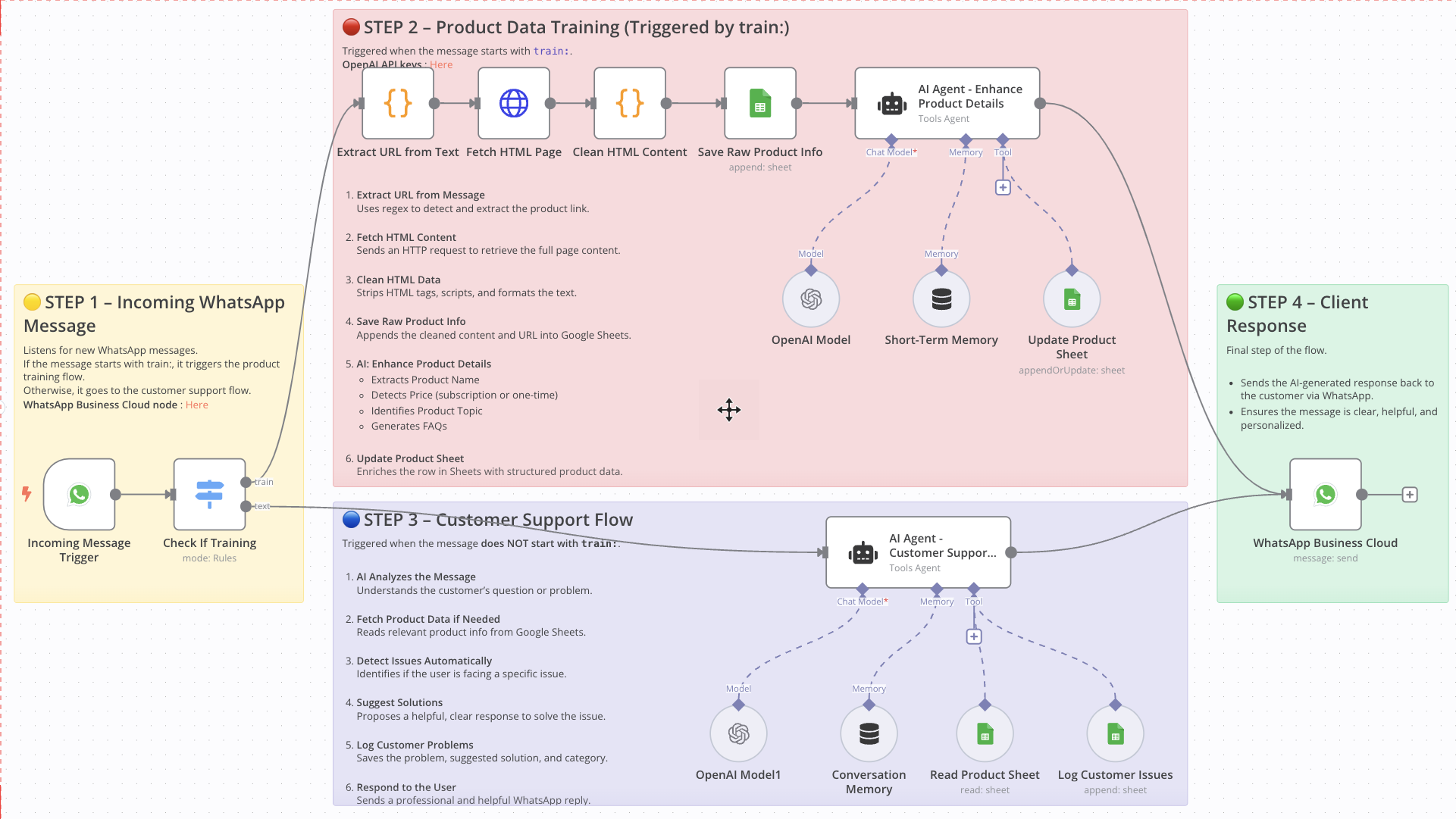
WhatsApp AI Agent: Auto-Train Product Data & Handle Customer Support
Who Is This For
This workflow is ideal for eCommerce founders, product managers, customer support teams, and automation builders who rely on WhatsApp to manage product information and interact with clients.
It’s perfect for businesses that want to automate product data entry and support responses directly from WhatsApp messages using GPT-4 and Google Sheets.
What Problem Does This Workflow Solve
- Manual Product Data Entry: Collecting and organizing product data from links is tedious and error-prone.
- Slow Customer Response Times: Responding to client questions manually leads to delays and inconsistent support.
- No Logging System for Issues: Without automation, support issues often go undocumented, making it harder to learn and improve.
What This Workflow Does
Step 1 – Incoming Message Detection
- Listens for incoming messages via WhatsApp.
- If the message starts with
train:, it routes to the product training process. - Otherwise, it routes to the customer support assistant.
Step 2 – Product Data Training
- Extracts URL from the message using a regex script.
- Fetches HTML content from the URL.
- Cleans HTML data to extract readable product description.
- Saves raw data (URL + description) into Google Sheets.
- Uses GPT-4 to enhance product data:
→ Name, price (one-time or subscription), topic, and FAQs. - Updates the product row in Google Sheets with structured information.
Step 3 – Customer Support Flow
- Analyzes user messages with GPT-4 to understand the request or issue.
- Looks up relevant product info in Google Sheets.
- Detects potential problems (e.g. payment, login, delivery).
- Suggests an appropriate solution.
- Logs the problem, solution, and category to the
Customer Issuessheet. - Sends a response back to the client via WhatsApp.
Step 4 – Client Response
- Sends the AI-generated response to the client via WhatsApp.
- Keeps the communication fast, clear, and professional.
Setup Guide
Prerequisites
- WhatsApp Business API access
- OpenAI API Key
- Google Account with Google Sheets access
- A hosted instance of n8n (Cloud or self-hosted)
Setup Steps
- Import the Workflow into your n8n instance.
- Connect your credentials for WhatsApp, OpenAI, and Google Sheets.
- Customize Google Sheet IDs and names as needed.
- Test by sending a
train:message or a regular customer message to WhatsApp. - Activate the workflow to make it live.
How to Customize This Workflow
- Edit AI prompts to reflect your product type, language style, or tone.
- Change the trigger keyword (e.g. from
train:toadd:or anything else). - Add integrations like Notion, Airtable, or CRM tools.
- Expand the Sheets structure with more product fields (e.g. stock status, image link).
- Add notifications to Slack or email after product updates or issue logging.
📄 Documentation: Notion Guide
Need help customizing?
Contact me for consulting and support : Linkedin / Youtube
🔗 Nodes Used
Google Sheets, HTTP Request, WhatsApp Business Cloud, AI Agent, OpenAI Chat Model, Simple Memory
📥 Import
Download workflow.json and import into n8n:
Workflow menu → Import from File