💬 Build an AI powered phone agent 📞🤖 with Retell, Google Calendar and RAG
⚡ 28,111 views · 💬 Support Chatbots
💡 Pro Tip — YouTube’s API quotas can be a bottleneck when you’re pulling data at scale. ScraperNode is a community node with dedicated scrapers for channels, videos, and comments — no quota limits, just structured data.

Description
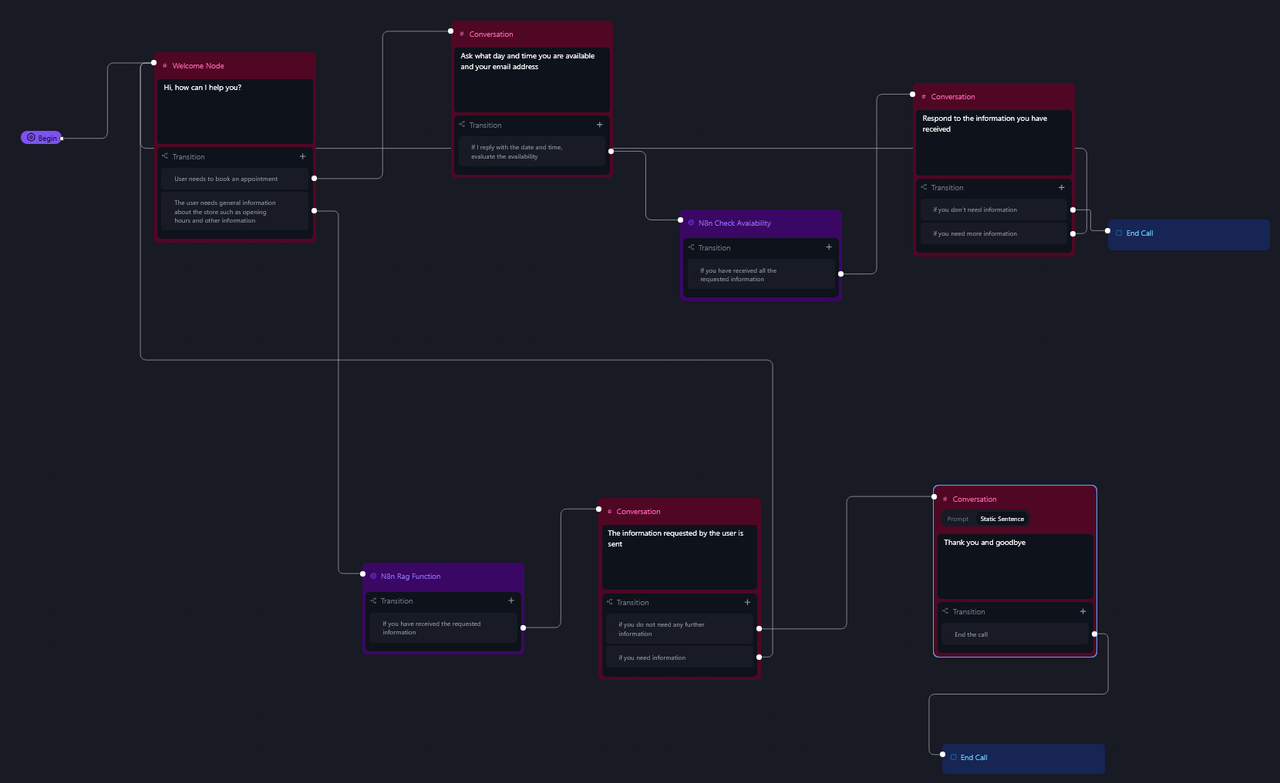
This Workflow simulates an AI-powered phone agent with RetellAI with two main functions:
- 📅 Appointment Booking – It can schedule appointments directly into Google Calendar.
- 🧠 RAG-based Information Retrieval – It provides answers using a Retrieval-Augmented Generation (RAG) system. For example, it can respond to questions such as store opening hours, return policies, or product details.
The guide also explains how to purchase a dedicated phone number (with a +1 prefix) and link it to the AI agent. This setup is cost-effective, as it uses a FREE $10 credit to operate without additional charges in the beginning.
✨ Advantages
- 🕐 24/7 Availability – The AI agent can answer calls and assist customers at any time.
- 🤖 Automation – It reduces the workload on human staff by handling repetitive tasks like appointment scheduling and FAQ responses.
- 🔌 Easy Integration – Built with n8n, it’s flexible and customizable for various platforms and tools.
- 💸 Low-cost Setup – Using the free credit, businesses can get started without an upfront investment.
📦 Use Cases
- 🛍 E-commerce – Answer common product questions or order inquiries.
- 🏬 Retail Stores – Provide store hours, address info, and return policies.
- 🍽 Restaurants – Take reservations or share menu information.
- 💼 Service Providers – Book appointments or consultations.
- 📞 Any Local Business – Offer phone support without needing a live operator.
How It Works
This Workflow simulates an AI-powered phone agent with two primary functions:
-
Appointment Booking
- The workflow captures call events (e.g.,
call_endedorcall_analyzed) and extracts key details (transcript, caller info, duration, etc.). - Using OpenAI, it summarizes the conversation and parses structured data (e.g., names, contact info, dates).
- For scheduling, it converts user-provided dates into Google Calendar-compatible formats and creates events automatically.
- The workflow captures call events (e.g.,
-
RAG-Based Information Retrieval
- When a query is received (e.g., store hours, product details), the workflow retrieves relevant information from a Qdrant vector store.
- An AI agent processes the query using the retrieved data and responds via a webhook, ensuring accurate, context-aware answers.
Set Up Steps
-
Prepare Qdrant Vector Store
- Create/refresh a Qdrant collection (via HTTP requests).
- Upload and vectorize documents (e.g., from Google Drive) using OpenAI embeddings.
-
Configure RetellAI Agent
- Sign up for RetellAI, create an agent, and set the webhook URLs (
n8n_callfor call events,n8n_rag_functionfor RAG queries). - Purchase a Twilio phone number and link it to the agent.
- Sign up for RetellAI, create an agent, and set the webhook URLs (
-
n8n Workflow Setup
- Connect OpenAI, Qdrant, Google Calendar, and Telegram nodes with credentials.
- Customize prompts for summarization, date parsing, and RAG responses.
- Test the workflow to ensure data flows from call events → processing → actions (e.g., calendar bookings, Telegram alerts).
-
Deploy
- Trigger the workflow via RetellAI webhooks during calls.
- Monitor outputs (e.g., call summaries in Telegram, calendar events).
Note: Replace placeholders (e.g., QDRANTURL, COLLECTION, CHAT_ID) with actual values.
👉 Subscribe to my new YouTube channel. Here I’ll share videos and Shorts with practical tutorials and FREE templates for n8n.

Need help customizing?
Contact me for consulting and support or add me on Linkedin.
🔗 Nodes Used
HTTP Request, Webhook, Telegram, Google Drive, Google Calendar, Filter
📥 Import
Download workflow.json and import into n8n:
Workflow menu → Import from File