💬 Automate WhatsApp booking system with GPT-4 Assistant, Cal.com and SMS reminders
⚡ 15,636 views · 💬 Support Chatbots
Description
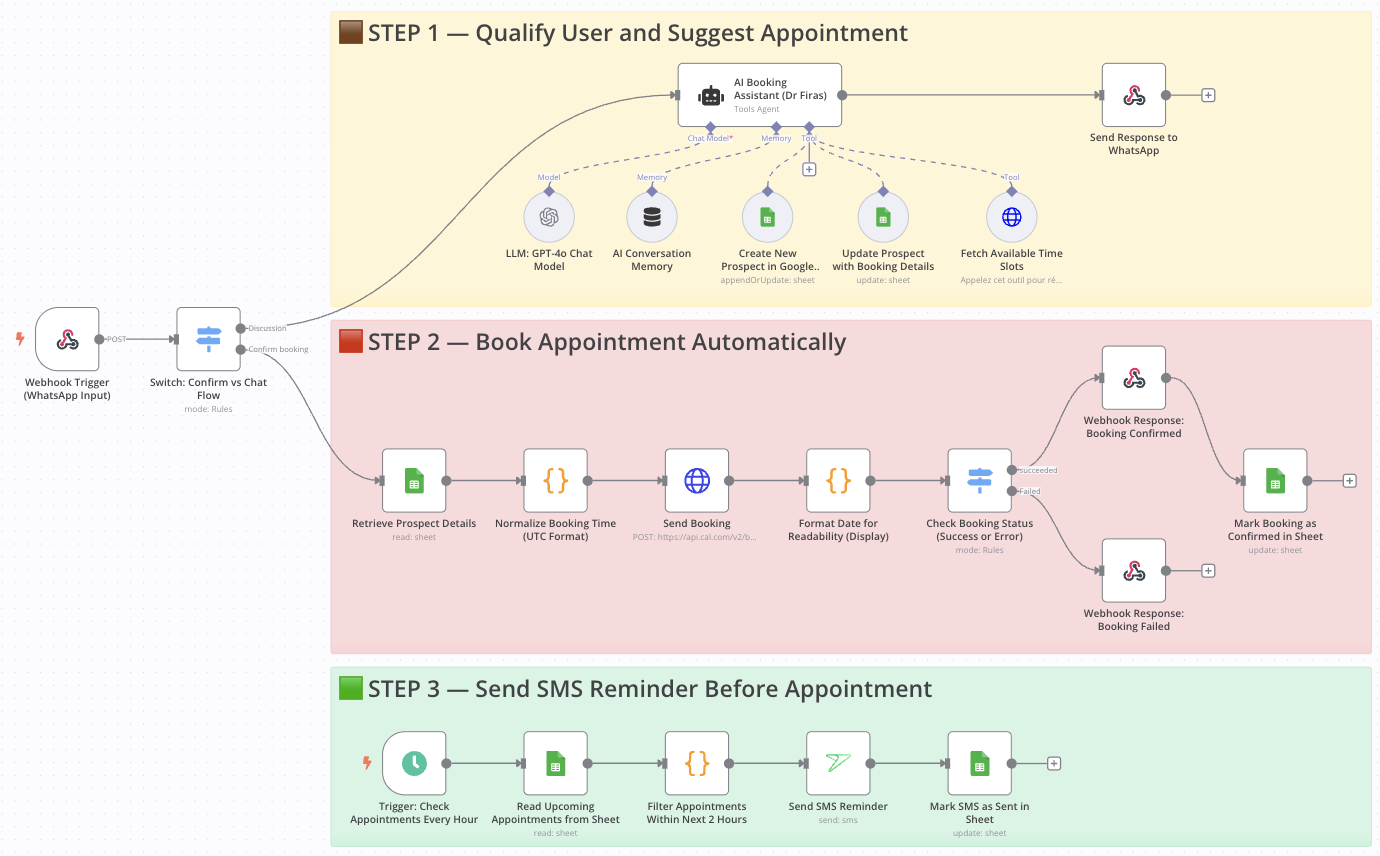
AI-powered WhatsApp booking system with instant SMS confirmations
Who is this for?
This workflow is designed for solo entrepreneurs, consultants, coaches, clinics, or any business that handles client appointments and wants to automate the entire scheduling experience via WhatsApp — without the need for live agents.
What problem is this workflow solving?
Responding to inbound messages, collecting booking details, suggesting available times, and sending reminders can be a huge time drain. This workflow eliminates manual handling by:
- Automating WhatsApp conversations with an AI assistant
- Booking appointments directly into Cal.com
- Sending timely SMS reminders before appointments
It ensures you never miss a lead or a follow-up — even while you sleep.
What this workflow does
From a single WhatsApp message, the workflow:
- Triggers via a WhatsApp webhook
- Uses GPT-4 to handle conversation flow and qualify the prospect
- Collects name, email, selected service
- Calls Cal.com API to fetch available time slots
- Books the appointment and stores it in Google Sheets
- Sends a confirmation message via WhatsApp
- Periodically scans for upcoming appointments
- Sends SMS reminders to clients 2 hours before their session
Setup
- Connect your Webhook node to a WhatsApp API (e.g., 360dialog, Twilio, or Ultramsg)
- Add your OpenAI API key for the GPT-4 nodes
- Configure your Cal.com API key and set your calendar ID
- Link your Google Sheets with fields like:
name,email,date,time,status,reminder_sent - Connect your SMS service (e.g., sms77) with API credentials
- Adjust the schedule in the reminder node as needed
How to customize this workflow to your needs
- Change the language or tone of the AI assistant by editing the system prompt in the GPT node
- Filter available time slots by service, team member, or duration
- Modify the reminder timing (e.g., 1 hour before, 24h before, etc.)
- Add conditional logic to route users to different booking flows based on their responses
- Integrate additional CRMs or notification channels like email or Slack
📄 Documentation: Notion Guide
Need help customizing?
Contact me for consulting and support : Linkedin / Youtube
🔗 Nodes Used
Google Sheets, HTTP Request, Webhook, seven, Schedule Trigger, AI Agent
📥 Import
Download workflow.json and import into n8n:
Workflow menu → Import from File