💬 Create a customer support voice agent with GPT-5, ElevenLabs & calendar booking
⚡ 7,256 views · 💬 Support Chatbots
Description
Build a Customer Support AI Voice Agent with GPT-5 and ElevenLabs
👥 Who is this for?
This template is ideal for:
- Businesses that want to provide 24/7 automated voice-based customer support
- Service providers needing to schedule appointments via voice interaction
- Teams looking to handle multilingual customer queries automatically
- Entrepreneurs aiming to boost customer engagement without hiring large support teams
💡 What problem is this workflow solving?
Traditional customer support requires:
- Human agents to answer repeated questions
- Manual handling of bookings and confirmations
- Limited availability outside office hours
This workflow solves those issues by combining GPT-5 intelligence with ElevenLabs voice synthesis, enabling your website visitors to:
- Ask questions and receive spoken answers in multiple languages
- Request appointment availability
- Confirm bookings and receive automatic email confirmations
All of this happens automatically, reducing costs and ensuring consistent customer experience.
⚙️ What this workflow does
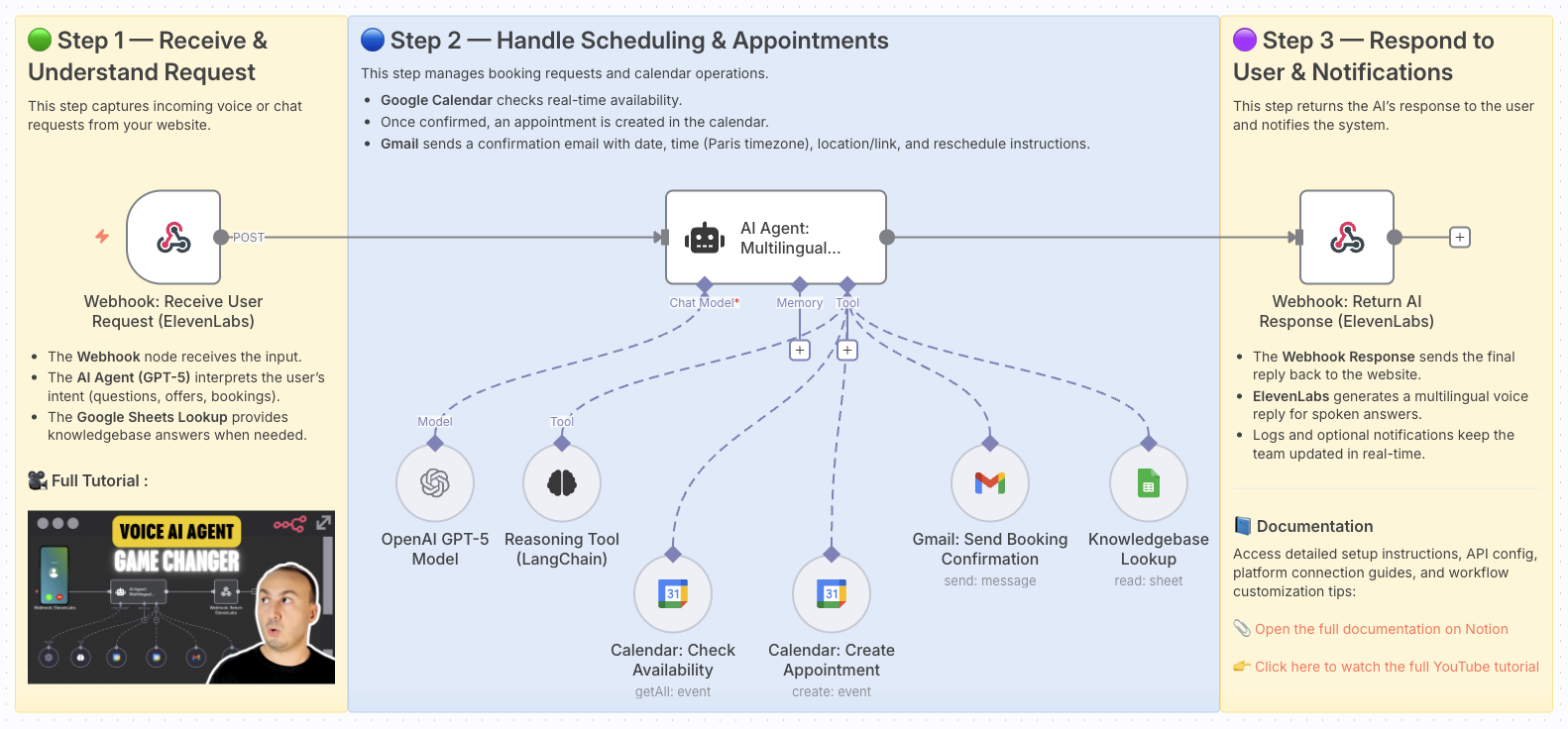
- Receive customer voice input via webhook from your website
- Transcribe and understand intent using GPT-5 and LangChain reasoning
- Fetch information from your knowledge base (Google Sheets) for FAQs, services, or policies
- Check availability in Google Calendar in real-time
- Create confirmed appointments only after explicit user confirmation
- Send confirmation emails with booking details via Gmail
- Respond back to the user with a multilingual spoken reply using ElevenLabs
🧰 Setup
Before launching this workflow, make sure you:
- Have an OpenAI API key for GPT-5
- Set up an ElevenLabs account and API key for voice input/output
- Enable Google Sheets API and prepare a sheet with your FAQ/knowledgebase
- Enable Google Calendar API and connect your calendar for scheduling
- Connect your Gmail account for booking confirmation emails
- Configure the Webhook URL on your website for sending voice requests
- Follow the sticky note instructions inside the workflow for final setup
🛠️ How to customize this workflow
- Knowledgebase: Add or update information in your Google Sheets to cover new FAQs
- Voice settings: Configure ElevenLabs voice style, tone, or supported languages
- Appointment rules: Adjust event duration or add reschedule/cancellation options
- Notifications: Add Slack or Telegram alerts for each new confirmed booking
- Email templates: Customize the confirmation email with your brand style
With this workflow, your website becomes an AI-powered voice assistant — capable of handling customer inquiries, providing multilingual support, and managing bookings seamlessly.
📄 Documentation: Notion Guide
Need help customizing?
Contact me for consulting and support : Linkedin / Youtube
🔗 Nodes Used
Webhook, AI Agent, OpenAI Chat Model, Think Tool
📥 Import
Download workflow.json and import into n8n:
Workflow menu → Import from File