💬 Build your first AI agent with ChatGPT-5
⚡ 14,530 views · 💬 Support Chatbots
Description
Build Your First AI Agent with ChatGPT-5
Who is this for?
This workflow is designed for beginners and professionals who want to build their first AI-powered assistant with n8n. It’s perfect for anyone managing online trainings, consultations, or services that require both a knowledge base and appointment scheduling.
What problem is this workflow solving?
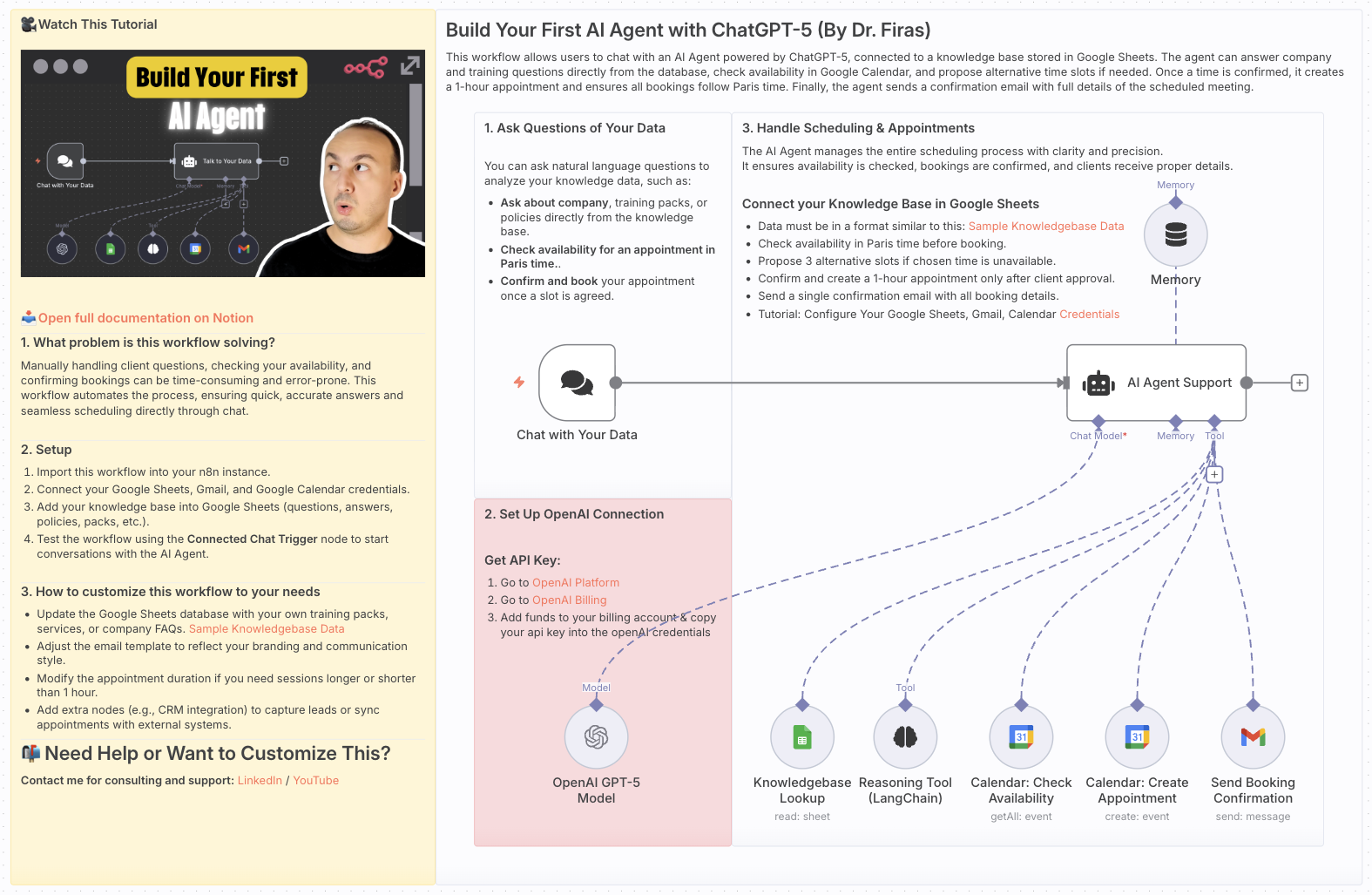
Manually handling client questions, checking your availability, and confirming bookings can be time-consuming and error-prone. This workflow automates the process, ensuring quick, accurate answers and seamless scheduling directly through chat.
What this workflow does
- Answers user questions using your knowledge base stored in Google Sheets.
- Checks availability in Google Calendar and proposes alternative time slots if needed.
- Books 1-hour appointments in Paris time only after client confirmation.
- Sends a professional confirmation email with all appointment details.
Setup
- Import this workflow into your n8n instance.
- Connect your Google Sheets, Gmail, and Google Calendar credentials.
- Add your knowledge base into Google Sheets (questions, answers, policies, packs, etc.).
- Test the workflow using the Connected Chat Trigger node to start conversations with the AI Agent.
How to customize this workflow to your needs
- Update the Google Sheets database with your own training packs, services, or company FAQs.
- Adjust the email template to reflect your branding and communication style.
- Modify the appointment duration if you need sessions longer or shorter than 1 hour.
- Add extra nodes (e.g., CRM integration) to capture leads or sync appointments with external systems.
📄 Documentation: Notion Guide
Need help customizing?
Contact me for consulting and support : Linkedin / Youtube
🔗 Nodes Used
AI Agent, OpenAI Chat Model, Simple Memory, Chat Trigger, Think Tool
📥 Import
Download workflow.json and import into n8n:
Workflow menu → Import from File